
Privacy
Privacy
Section titled “Privacy”Local. Truly local AI. No APIs to 3rd parties needed. Nothing leaves your system (if you don’t want it to).
Open source (pending).
All network traffic is proxied for transparency. Anything going in and out of Kaba is available for you to view.
What else do you need? The rest of this page says precisely what that means: what the privacy layer does to web traffic, what Kaba stores locally, and the specific cases where data leaves the machine.
The privacy layer
Section titled “The privacy layer”Every pane’s traffic passes through one policy. Defaults are strict. Change them under Settings → Security & Privacy, or make an exception for one site from the site panel in the Kaba bar.
| Protection | Default | What it does |
|---|---|---|
| Privacy layer | on | Master switch for everything below. |
| Third-party cookies | blocked | Cross-site cookies are stripped in both directions. Sign-in flows that span related sites still work, and an embed can ask for access through the Storage Access API. |
| Fingerprint protection | on | Sites see a plain Chrome identity. Canvas, WebGL, audio and font readings are subtly randomized per site and per session, so they cannot be used to recognise you. |
Upgrade http:// to https:// | on | Falls back per host, for the session, only when HTTPS fails at the network level. Local and private addresses are left alone. |
| Strip tracking parameters | on | utm_*, fbclid, gclid and similar are removed from links you open. |
| Skip redirect trackers | on | Known redirectors go straight to the destination. |
| Cap cookie lifetime | 180 days | Applies to cookies set by servers and by scripts. Session cookies are untouched. |
| Malware and phishing lists | on | Applied by the ad blocker locally. No lookup service sees your URLs. |
| WebRTC IP handling | hide local addresses | Options: hide local addresses, no direct UDP, or Chromium default. |
| DNS over HTTPS | secure | Cloudflare and Quad9. Secure never falls back to plaintext DNS; choose Automatic on captive-portal networks. Also enables Encrypted Client Hello. |
| Global Privacy Control | sent | Sec-GPC: 1 and Do Not Track on every request. |
| Client hints | reduced | Device and network hints are dropped; browser identity hints are pinned to generic values. |
Some settings are baked into a page when it loads (the master switch, fingerprint protection, Lockdown and WebRTC). After changing one, reload open pages; Settings offers a Reload open pages button.
[todo: add screenshot of Settings → Security & Privacy and of parts Privacy & anti-tracking toggles, Third-party cookies, WebRTC IP handling, DNS over HTTPS, Lockdown.]
When a site breaks
Section titled “When a site breaks”Strict defaults occasionally break a site. Rather than turning protection off globally, open the site panel from the Kaba bar and change one thing for that site:
- allow third-party cookies,
- turn fingerprint protection off (the site then sees the browser exactly as it is),
- turn ad blocking off,
- or forget the site, which clears its cookies, storage, service workers and caches.
Bot checks are handled for you. Challenge widgets are never randomized, sign-in pages of identity providers are left alone, and a site that serves a full-page “verify you are human” check gets fingerprint protection paused for 6 hours automatically.
Every override is listed under Settings → Sites, where you can remove them one by one or all at once.
Lockdown
Section titled “Lockdown”Lockdown is the least a site can get. It is off by default and meant for reading untrusted pages. Turn it on for one site or one pane from the Kaba bar, or for every site in Settings.
| Lockdown turns off | Why |
|---|---|
| JavaScript | Scripts are what fingerprint, track and exploit; without them a page is a document. |
| Time zone | Reported as UTC, so your location does not leak through the clock. |
| Exact screen size | Rounded down to 200 px steps, because window size is a strong identifier. |
| OS preferences | Colour scheme, reduced motion, contrast and similar read as defaults. |
| Speech voices | The installed voice list is unique per machine; two generic voices are reported. |
| WebRTC | No direct UDP, so peer connections cannot reveal addresses. |
| Sensors and devices | Camera, microphone, location, notifications, MIDI, USB, HID, serial and clipboard requests are denied without asking. |
Lockdown breaks logins, players, web apps and every bot check.
Ad blocking
Section titled “Ad blocking”There are two blockers. The client blocks ads and trackers inside the browser, using the filter lists chosen in Settings (EasyList, EasyPrivacy and others; you can add your own). The engine’s proxy applies its own list to everything that passes through it, including terminal traffic when the terminal uses the proxy.
Blocking resolves in this order: a pane’s setting, then the site’s, then the global default. Toggle it globally from the Kaba menu, per site from the Kaba bar, and per pane from the pane menu.
Ghost Mode
Section titled “Ghost Mode”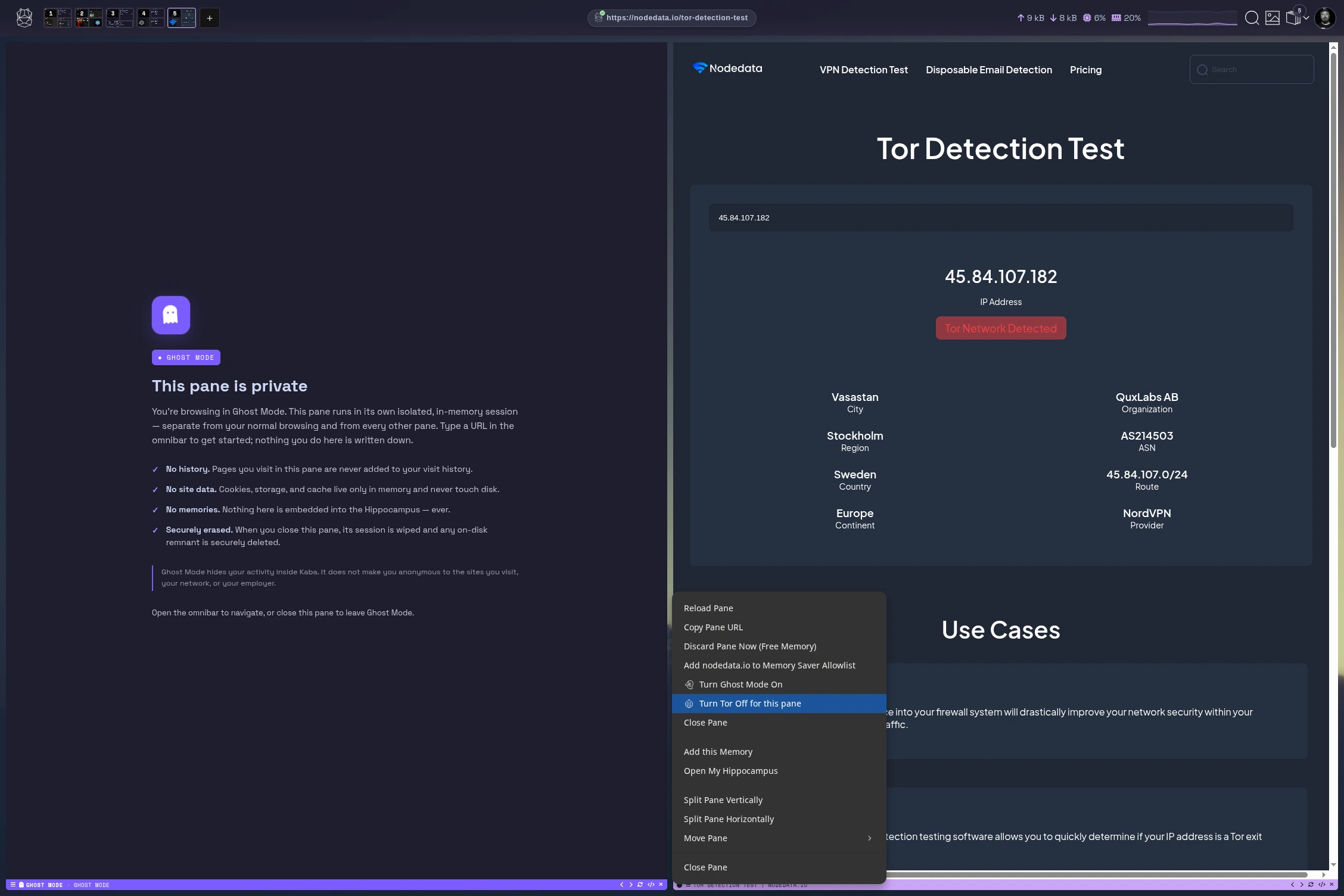
A Ghost pane runs in its own in-memory session, separate from your normal browsing and from every other pane. Open one with New Ghost Pane (Super+Shift+P on Linux, Cmd+Shift+P on macOS, Ctrl+Shift+P on Windows), or switch an existing pane from its menu.
- No history. Pages are never added to your visit history.
- No site data. Cookies, storage and cache live only in memory.
- No memories. Nothing is saved to Hippocampus, and nothing is recorded as learning data.
- Securely erased. When the pane closes, its session is wiped and any on-disk remnant is overwritten and deleted.
Ghost Mode hides your activity inside Kaba. It does not make you anonymous to the sites you visit, your network, or your employer. Combine it with Tor for that.
Tor is built into the engine; there is nothing extra to install.
| Scope | How |
|---|---|
| One pane | Pane menu → turn Tor on for this pane. The pane’s status bar shows a Tor badge. |
| Everything | Settings → Security & Privacy → Tor routing. |
| A service you publish | Enable Tor service when exposing it to get an .onion address. |
Tor panes always use the strictest WebRTC setting. Ghost Mode and Tor can be on together in the same pane.
What Kaba stores
Section titled “What Kaba stores”Everything below is stored on your device, in the storage directory.
| Data | Stored when | Control |
|---|---|---|
| History and site data | You browse in a normal pane | Hippocampus → History; Settings → Sites |
| Memories of pages | Enable Memory is on (default) | Settings → Features; Memory Ignore List; delete in Hippocampus |
| Terminal sessions | Remember terminal sessions is on | Settings → Features; per-session toggle in the terminal |
| File activity | Remember file activity is on | Settings → Features |
| Learning data | Enable Learning Data is on | Settings → Features; Delete all learning data |
| Saved logins and passkeys | You save one | Settings → Passwords |
| Saved frames | You save one | Hippocampus → Frames |
Memories, learning data and saved logins are encrypted with a key derived from your account password. See security.
What is never recorded
Section titled “What is never recorded”- Anything in a Ghost pane.
- What you type in a terminal. Only commands and their output are kept, so a password entered at a prompt is not captured.
- The content of full-screen terminal programs such as editors and password managers. They are noted as having run, nothing more.
- Output from password managers, and the contents of files like
.env. - A terminal command started with a space, as with shell history.
- Passwords and payment fields in web forms.
- Pages and domains on the Memory Ignore List.
Keys and tokens that do get printed in a terminal are replaced with a placeholder such as [REDACTED:aws_key] before anything is saved.
Removing something
Section titled “Removing something”Hippocampus → remove text from memory searches every memory for an exact string. Terminal sessions are rewritten with the text replaced; any other memory containing it is deleted. An adapter already trained on that memory still carries it, so retrain any adapter made since.
When data leaves your device
Section titled “When data leaves your device”Kaba Personal has no account server and sends no analytics. These are the cases where something does go out:
| What | Goes to | When |
|---|---|---|
| Your browsing | The sites you visit | Always, through the privacy layer |
| DNS queries | Cloudflare and Quad9 over HTTPS | Unless DoH is off |
| Filter lists and threat feeds | Their publishers | On update; checks happen locally |
| Model and voice downloads | A mirror, then Hugging Face | When you request a model |
| Software updates | The update server | Only if automatic updates are on (off by default) or you check manually |
| Encrypted mesh traffic | Your own peers, or a relay that cannot read it | When you have a cluster |
| Desktop widgets | The service each widget shows (weather, news, and so on) | While that widget is on your desktop |
| Public service announcements | The public directory | Only for services you mark public |
Your memories, prompts, model outputs and adapters are not in this list. They move only between devices in your own cluster, when you ask.
[todo: confirm whether the “Enable analytics” toggle is still shown in Settings. The setting key exists in the client, but nothing in kaba 0.146 reads it or sends data.]