
Hippocampus
Memories for your Kaba experience.
In the human brain, the hippocampus orchestrates the consolidation of information from short-term memory to long-term memory, as well as spatial memory that enables navigation. It acts much the same way in Kaba.
| Open it with | |
|---|---|
| Kaba menu → HippoCampus | |
/data in the omnibar | Aliases /d, /hippo |
| Pane menu → Open My Hippocampus | |
kaba://hippocampus/ | As an address |
The sidebar switches between views, and the search box at the top searches the current one.
[todo: add screenshot of Hippocampus and of parts the sidebar (Frames, Memories, Automation, Extraction, History, Downloads, Discovery, Services), the search box, the main view.]
Memories
Section titled “Memories”- Observable memory acquisition
- Automated memory acquisition
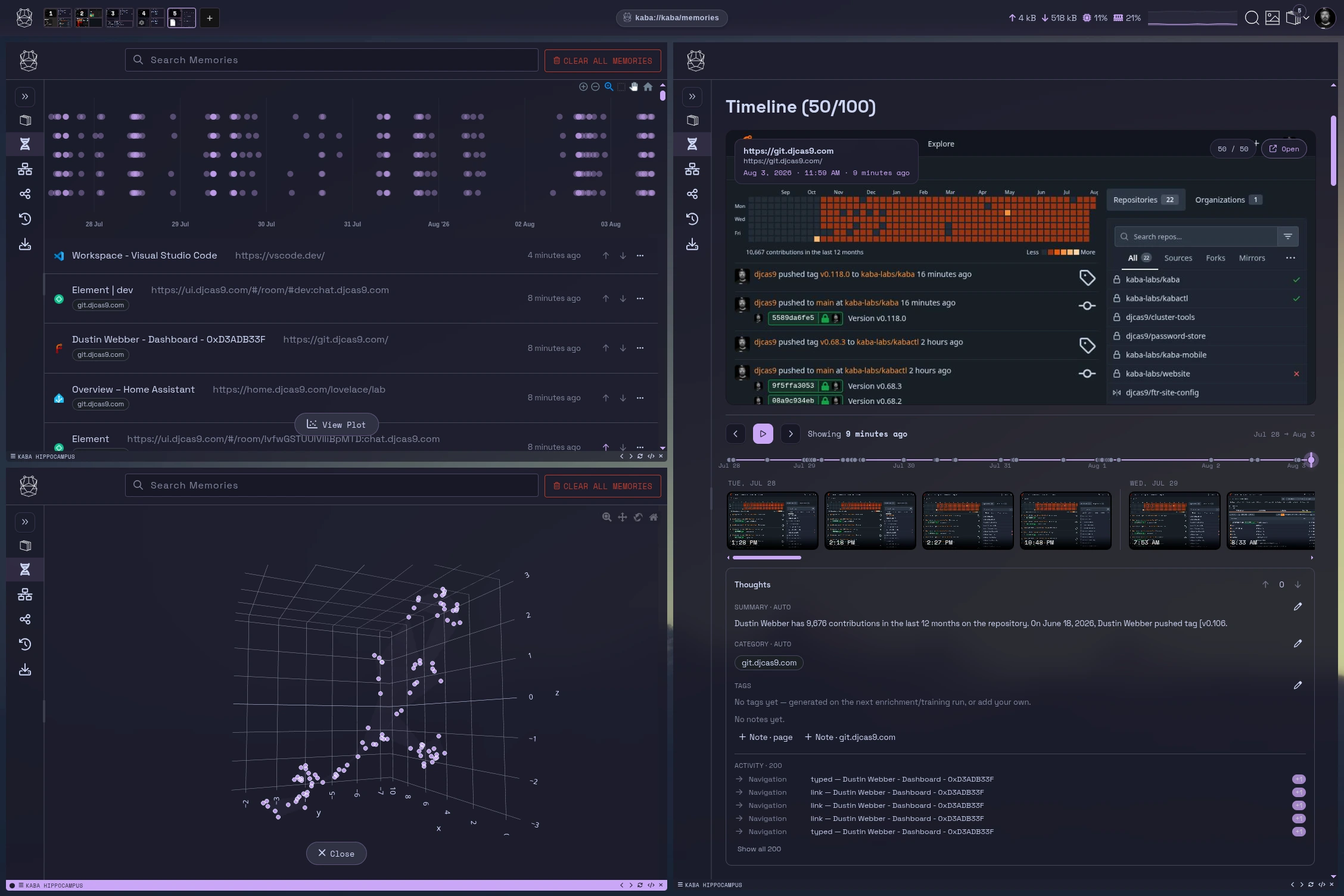
A memory is a saved snapshot of something you saw or did: a web page, a terminal session, file activity, or a project conversation. Memories are stored in an encrypted vector store on your device, so you can search them by meaning, not just by keyword. For the thinking behind them, see What are memories in Kaba below.
How memories are made
Section titled “How memories are made”| Source | When |
|---|---|
| Pages you visit | Automatically as you browse, when Enable Memory is on. |
| A page you choose | File → Add to memory (Ctrl/Cmd+S), or right-click → Add this Memory. |
| Terminal sessions | When Remember terminal sessions is on. See terminal memory. |
| File activity | When Remember file activity is on. |
| Project conversations | Each exchange in a project is captured as a version. |
| Automations | On the schedule you set. |
Nothing is captured in a Ghost pane, or for pages and domains on your Memory Ignore List. See what is never recorded.
Browsing and searching
Section titled “Browsing and searching”The Memories view shows a list and a timeline you can zoom. Memory scope switches between All memories and Everything (incl. system). Search from the box at the top, or from anywhere with /mem <query> in the omnibar.
[todo: add screenshot of the Memories view and of parts the memory list, the timeline with zoom, Memory scope, search results.]
A memory in detail
Section titled “A memory in detail”Open a memory to see:
- Versions. Each capture of the same page is kept as a version, with its snapshot. Step through them to see how a page changed.
- Category and tags. Filled in by the next enrichment or training run, or set them yourself.
- Thoughts. Your own notes about this memory, with optional file attachments. A thought is up-weighted when the memory trains.
- Training weight. Boost in training or Suppress in training tells Kaba how much this memory should count.
- Usage. How the page was used, recorded for on-device learning when Enable Learning Data is on.
From the detail view you can also Annotate a screenshot (crop, arrows, blur, notes) and save it back, edit the memory, download an attachment, or delete it.
[todo: add screenshot of a memory detail and of parts the version stepper, the snapshot, category and tags, Thoughts, Boost/Suppress in training, Annotate.]
Curating for training
Section titled “Curating for training”Memories are the raw material for training. Three tools shape what a model learns from them:
- Boost / Suppress on individual memories.
- Thoughts, to say in your own words what matters.
- The Memory Ignore List (Settings), to keep whole sites out.
Removing text
Section titled “Removing text”If a password or key ended up in a memory, use Remove text from memory. Paste the exact text; Kaba searches every memory for it. Terminal sessions are rewritten with the text replaced, and any other memory containing it is deleted. The same page shows what the terminal recorder has kept out over the last 30 days.
About Custom Rules
Section titled “About Custom Rules”In the Hippocampus sidebar this is Extraction. Create a rule with New Rule, edit it in the built-in editor, or delete it. When Enable Memory is off, the Memories and Extraction views are hidden.
[todo: add screenshot of the Extraction view and of parts the custom rules list, New Rule, a rule file open in the editor.]
Kaba’s memory extraction tool makes use of site-specific extraction rules to improve results. Each time a URL is processed, it checks to see if there are extraction rules for the site being processed. If no rules are found, it tries to detect the content block automatically.
How to write a site config file
Section titled “How to write a site config file”The quickest and simplest way is to use our point-and-click interface. It’s a simple tool only intended to create a rule to extract the correct content block.
Kaba’s custom memory extraction rules are stored in ~/.config/kaba/custom-rules.
For further refinements, e.g. selecting the title, stripping elements, dealing with multi-page articles, please see our help page.
File naming
Section titled “File naming”Use git.djcas9.com.txt for
- www.git.djcas9.com
- git.djcas9.com
Use .djcas9.com.txt for
- sport.djcas9.com
- news.djcas9.com
- environment.djcas9.com
- etc.
Use sport.djcas9.com.txt to target just that sub-domain:
- sport.example.com
Note: .djcas9.com.txt will not match www.djcas9.com or djcas9.com
Testing site config files
Section titled “Testing site config files”kabactl will monitor the custom-rules directory for modifications, additions, and deletions. When a new rule is added inside of the Kaba UI, navigate to the site you are testing and ctrl + s to create a new memory. You can validate the information is being parsed correctly by opening the memory in the Hippocampus.
Example of a custom rule
Section titled “Example of a custom rule”Kaba & article_scraper: Creating Observable Memory
Section titled “Kaba & article_scraper: Creating Observable Memory”At the core of Kaba’s ability to learn and recall information is its integration with the Rust-based article_scraper crate. While Kaba comes pre-packaged with thousands of rules covering roughly 80% of the public web, its true power lies in its custom rule parsing syntax. This allows Kaba to treat internal, self-hosted, or enterprise-grade applications—like a private Forgejo instance—as a structured, observable memory bank.
The Anatomy of a Kaba Scraping Rule
Section titled “The Anatomy of a Kaba Scraping Rule”Kaba uses a declarative syntax to tell article_scraper exactly what matters on a page and what is “noise.” This is particularly vital for developers who host their own infrastructure to avoid the tracking or adversarial nature of centralized platforms. Using our internal source code host, git.djcas9.com (based on Forgejo), as an example, here is how we define a scraping profile:
# 1. SCOPE: Define where these rules apply# This ensures Kaba only uses this logic on your specific domain or URL pattern.condition: contains($url, "git.djcas9.com")
# 2. SELECTION: Identify the "Meat"# We use XPath to prioritize content.# Here, we target rendered Markdown first, then raw code views, then general repo content.body: //div[contains(@class, 'markup')] | //div[contains(@class, 'file-view')] | //div[@id='repo-content']
# 3. CLEANUP: Strip the UI Noise# To keep the "memory" clean, we remove line numbers, navigation tabs, and buttons.strip: //td[contains(@class, 'lines-num')]strip: //div[contains(@class, 'file-header-far')]strip: //div[contains(@class, 'ui-tabs-nav')]strip: //button
# 4. METADATA: Title Extraction# This sets the "Header" of the memory entry for easier retrieval later.title: //div[contains(@class, 'repo-title-wrapper')] | //span[@id='issue-title']
# 5. OPTIMIZATION: Prune# Setting prune to 'yes' tells Kaba to discard any HTML not explicitly matched in 'body'.prune: yes
# 6. VALIDATIONtest_url: https://git.djcas9.com
Why Custom Rules Matter
Section titled “Why Custom Rules Matter”For most users, the default rules are invisible and “just work.” However, for Enterprise and Self-Hosted environments, custom rules provide three distinct advantages:
-
Precision: By stripping out line numbers and UI buttons, Kaba’s LLM processes only the logic of your code or the substance of your internal discussions, reducing token waste and improving accuracy.
-
Privacy: Since the scraping logic happens within your Kaba instance, you can index internal tools (like Forgejo, Jira, or internal Wikis) without exposing that data to external scrapers.
-
Contextual Awareness: Kaba treats your internal documentation as a first-class citizen, allowing you to query your private codebase with the same ease as a public StackOverflow thread.
Technical Implementation Note
Section titled “Technical Implementation Note”The article_scraper crate processes these rules using a highly efficient Rust backend, ensuring that even large internal repositories can be indexed into Kaba’s observable memory with minimal latency.
History
Section titled “History”Every page visited in a normal pane, newest first. Search it, remove single entries, or clear it. Ghost panes never appear here.
Saved Frames
Section titled “Saved Frames”Saved frames: layouts with their pages, kept under a name. Click one to reopen it. Drag to reorder; the desktop’s Frames widget shows the top frames in this order.
Saved frame groups appear here too. Open group opens every frame in the group and groups them in the strip. Double-click a group to rename it.
Save the current frame with Save current Frame in the Frames Menu or the frame’s right-click menu. Open one from anywhere with /frame <name>.
[todo: add screenshot of the Frames view and of parts saved frames, a saved group, Open group, the reorder handle.]
Automation
Section titled “Automation”Scheduled captures. An automation visits a URL on a schedule and saves the result as a memory, which is useful for pages you want a running record of.
| Field | |
|---|---|
| Name | |
| URL | The page to capture. |
| Schedule | Cron syntax, five fields: minute, hour, day of month, month, day of week. |
| Category, tags | Optional labels applied to the memories it creates. |
The view lists each automation with its next run time. Pause or resume them individually.
0 8 * * 1-5 # 08:00 on weekdays*/30 * * * * # every 30 minutes[todo: add screenshot of the Automation view and of parts the automation list with Next Run, the Edit Automation dialog (Name, URL, Schedule, Category, tags).]
Downloads
Section titled “Downloads”Everything you have downloaded, with pause, resume and cancel for active downloads, and Open the file, Show in Files, Show in System and remove for finished ones.
Discovery
Section titled “Discovery”Discovery reads your recent activity and shows you its shape. Choose the period at the top.
| Section | Shows |
|---|---|
| Wrapped | A summary of the period. |
| Connections | A graph of sites you moved between within 10 minutes of each other. Node size is visits. |
| Threads | Sites you kept coming back to. |
| Rediscover | Things worth another look. |
| Suggested frame groups | Sites you keep moving between that no saved frame or group covers yet. |
| Saved frames | Your frames, with their panes and numbers. |
| Top sites | Visits for each top site over the period. |
Pick an hour or a page to see what you were doing, then Open all in a frame, Open as frame group, Copy URLs, or Ask Kaba about it.
Discovery is computed on your device from your own history. Open it with /discover.
[todo: add screenshot of Discovery and of parts Wrapped, the Connections graph, Threads, Suggested frame groups, the period selector.]
Services
Section titled “Services”Publish something running on this machine to your mesh, or to the public.
Click Expose and fill in:
| Field | |
|---|---|
| Name | For example My blog. The address slug is derived from it. |
| Local target | The local host:port to expose. |
| Protocol | http, https or tcp. |
| Visibility | private (reachable with an access token) or public (announced and indexed by its page metadata). |
| Description | Optional. |
| Tor service | Also publish as an .onion address. |
Each service shows its address, a Copy button, Rotate token for private services, an enabled switch and live traffic. See protocols.
[todo: add screenshot of the Services view and of parts the service list, the Expose dialog (Name, Local target, Protocol, Visibility, Tor service), the address with Copy and Rotate token, live traffic.]
Where it is stored
Section titled “Where it is stored”Memories live in an encrypted store per account, under the storage directory. History, frames, downloads and automations are in kaba.db. Nothing here is uploaded anywhere. That is Kaba Personal; on a fleet-managed device, retention is set centrally and fleet search can query memories within what policy allows. See what fleet control changes. See privacy and security.
What are memories in Kaba
Section titled “What are memories in Kaba”Kaba memories are a verbatim data structure representing any interaction, communication, or experience with any core Kaba functionality (web sites, apps, peripherals (via wasm), etc). Every load of a website and every javascript navigation triggers the Kaba memory acquisition process. The memory acquisition process captures all salience of a given page – title, content, links, stylesheets, scripts, video, audio, and sends this info to kabactl to be vectorized and stored in a versioned manner inside lancedb.
Kaba also grabs screenshots of memories and watermarks for enforceable and verifiable credibility (veracode / norton) The hippocampus in Kaba facilitates CRUD style interactions with these memories. Not only individual memories, but their interconnectivity and overlap/union/intersection.
Memories can also hold metadata – context & prompt as two examples. The reason this is useful is eg using Matrix chat server and a particular channel needs extra information (username - actual name; channel - topic). And the prompt gives more direction in how to process and expand on interactions with that memory. “Show this as a conversation between two people”.
Prompt is direction on how to present a memory how to render Context is direction on how to process a memory how to interpret
Searching Memories
Section titled “Searching Memories”The search functionality in the Hippocampus does a full embed similarity search against all memories and versions using models to take natural language time constraints and converting those into programmatic timestamps for better memory management. Eg ‘last Wednesday’ is inferred automatically to mean the prior Wednesday via this process.
Using Memories for Better Models
Section titled “Using Memories for Better Models”All memories are stored in industry standard structures that facilitate direct memory < = > model production. All salience from a given memory becomes features that can be trained on. Eg: all faces on images I have seen => create visual recognition model. All of the javascript I’ve loaded => build a fingerprinting and recognition model. All text I’ve written => produce a large language model.
Physical Memories
Section titled “Physical Memories”Memories from digital communications are only the beginning. Using memories from modern web APIs (serial, HID, bluetooth, usb), Kaba can directly siphon information from embedded devices, computers, or peripherals to either enhance an existing memory or to create a corpus of brand new types of memories. This leads to true hardware responsive interactions. If the system understands the hardware, context and LLM interactions reap the benefit.
What about legacy applications / operating system level context and memories?
Section titled “What about legacy applications / operating system level context and memories?”Built into kaba is x86 and wasm based virtualization technologies that allow emulation of any legacy or modern operating system. Keeping these interactions inside the world of context that Kaba can observe. Everything outside Kaba should remain your privacy (ie your os should remain private to you – you’re not a monkey in a zoo). By going further than Kaba and introducing AI to system level things introduces too much risk and vulnerability. There is such a thing as too much context, ask Splunk. Too much data, cost skyrocket, impossible to find needle in haystack. Add what matters, not everything. Maps v territories. There’s a reason it’s called attention, but frontier models are built on adhd. You don’t capture the world and call it attention. Also, whose attention? Train on your attention, not your distraction.
Autonomous Memory collection = MCP is redundant
Section titled “Autonomous Memory collection = MCP is redundant”Inline acquisition of context by the act of observation means the mechanisms of a browser solve all the infrastructure and business logic required to infer context and interconnectivity of the url of the data being viewed. Eg. harder for computer to determine: information about current news or CNN.com. “Today there was a riot in Minneapolis”. Where do you tie that into what you’re doing. url’s = natural context indexing. You can’t go to CNN.com to do math research.
Memory acquisition and processing
Section titled “Memory acquisition and processing”Parsing Engine - site-specific article extraction rules to aid content extractors, feed readers, and ‘read later’ applications. Include read-me file naming